
PRINSUB for Windows
- Unlimited transcription on your own PC, free
- The full editor, three caption styles, SRT and MP4 export
- Windows 10 and 11
- No account needed to make subtitles
Subtitle app for Windows 10 and 11
PRINSUB turns the speech in your videos into editable subtitles, right on your PC. Transcription, editing and export are free and unlimited, with no watermark. Add cloud AI only when you want it.

PRINSUB for Windows is available now. A browser version is in development.
Coming soon
On a Mac or a Chromebook? The Windows app does not run there yet. A browser version is in development.
Every caption is a card you can retype, retime, split or merge while the video plays beside it.
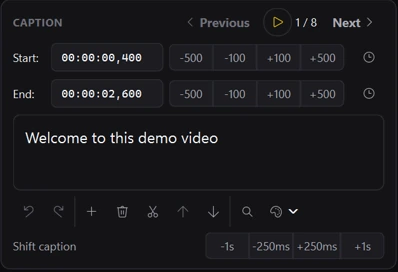

Making subtitles never needs a subscription. All of this runs on your PC, with no account and no limits.
MP4, MOV, MKV, WebM and more. Portrait or landscape.
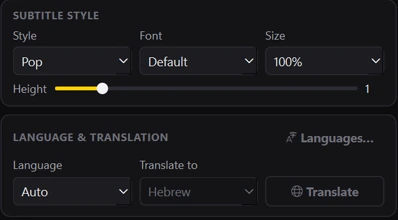
Transcription runs on your PC. Pick the language or let PRINSUB detect it.
Correct words, adjust timing, choose a style, font and size.
An SRT file, or an MP4 with the captions burned in.

Two cloud features for creators who publish often or in more than one language. Nothing is sent until you give permission the first time you use AI.
AI listens to the audio again and corrects words the transcription misheard, such as names and brand terms. The corrected captions land in the editor, where you can still change anything.
1 AI Minute per minute of video
Translate your captions into any of 62 languages. Each language becomes its own subtitle track that you can edit, style and export on its own.
1 AI Minute per minute of video, per language
Transcription in the Windows app is free and unlimited. AI Minutes are used only by the cloud features, Fix Words and Translate. Pick a monthly plan, or buy minutes once with no subscription. Prices exclude tax. No overage charges.
$0forever
$12/ month, plus tax
250 AI Minutes each month
Available soon
$24/ month, plus tax
540 AI Minutes each month
Available soon
$49/ month, plus tax
1,150 AI Minutes each month
Available soon
$99/ month, plus tax
2,400 AI Minutes each month
Available soon
Paid plans and AI Minute purchases are not open yet. The free Windows app is available now; this is how buying will work once they open.
Paddle.com is the merchant of record for all our orders and handles payment, tax and receipts. You can cancel a plan at any time in the app.
Every AI feature uses 1 AI Minute for each minute of video it processes. Translation counts once per language.
A 10-minute video, fixed by AI and translated into 3 languages, uses up to 40 AI Minutes: 10 for Fix Words and 30 for the translations.
Counting starts at your first caption and stops at your last, so silence before and after the speech is not counted. Pauses between captions are.
Yes. Transcription, editing, styling and export in the Windows app are free with no time or minute limits, and exports carry no watermark. You only need a plan, or a one-time purchase of AI Minutes, for the AI features, Fix Words and Translate.
A 64-bit PC with Windows 10 or Windows 11. Transcription runs on your own computer, so a faster PC finishes sooner.
Not yet. The Windows app does not run on macOS. A browser version, PRINSUB Online, is in development and is not available yet.
The free transcription supports over 50 spoken languages, including English, Spanish, French, German, Portuguese, Arabic and Hebrew. Translate can produce captions in 62 languages.
No. Transcription, editing and export run entirely on your PC. The first time you use an AI feature, PRINSUB asks for your permission. AI features send only what they need: Fix Words sends the caption text and the matching audio. Translate sends the caption text. The video picture is never sent.
One minute of video processed by one AI feature. Fixing a 5-minute video uses 5 AI Minutes. Translating it into 2 languages uses another 10. The app shows how many AI Minutes a feature will use before it runs.
AI features pause until your plan renews, you move to a larger plan, or you buy more minutes once. Purchased minutes never expire. There are no overage charges, and the free features keep working.
In the Windows app: open Account, create a free account, then choose Subscribe for a monthly plan or Buy AI Minutes for a one-time purchase. Checkout is provided by Paddle, our reseller.
Paddle.com is the merchant of record for all our orders. Plans are billed monthly and one-time minutes once, in US dollars, and applicable tax is added at checkout based on where you live. You can cancel a plan at any time in the app; it then ends at the end of the month you paid for.
Download the free Windows app. Add AI only when you need it.
